Tech Versus Reliability
Modern vehicles mix proven mechanical design with software-heavy features such as adaptive cruise control, infotainment, telematics, and over-the-air updates. Reliability risk rises when a feature depends on sensors, wiring, cloud services, or complex calibration routines that can fail in ways older systems rarely did. A practical approach weighs each tech feature against the failure modes it introduces, then compares that risk to the benefit you actually use.
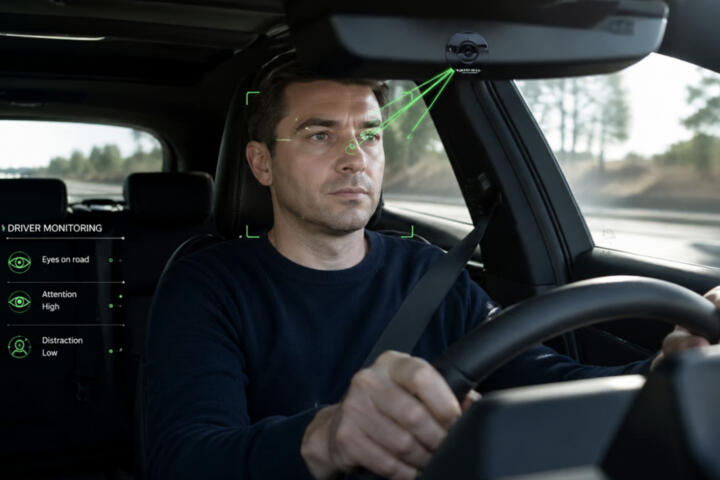
For example, a navigation app that reroutes around traffic depends on a data connection and map updates; if it fails, the car still drives. A driver-assist function that uses the same camera and radar stack can behave differently when the sensor is dirty, miscalibrated, or blocked. The difference matters because one failure mode affects convenience while the other can affect driving behavior.
When you evaluate a car, separate “tech you can ignore” from “tech that changes how the car operates.” That separation keeps the decision grounded in what you will notice during daily driving, not in marketing claims.
Main Problems And Pain Points
People often treat “new features” as a single bucket, but reliability problems usually cluster around a few dependencies. Cameras and radar need clean optics and correct alignment; a minor windshield replacement or a poorly performed calibration can shift performance. Electronic control units also depend on stable power and communication on the vehicle network; a weak battery or corroded ground can trigger faults that look like software bugs.
Another common mistake involves confusing recall coverage with long-term reliability. Recalls address specific safety or compliance issues, but they do not guarantee that every related component will remain trouble-free. Some issues show up after warranty periods because they depend on wear, heat cycles, or repeated software update paths.
Telematics and connected services add a different risk type: service availability. If a car’s cellular modem, carrier coverage, or backend account provisioning fails, the feature may stop working even though the vehicle remains mechanically sound. In one aside, I’ve seen owners report that remote commands stopped after a subscription change, even though the car’s hardware still powered normally.
Over-the-air updates also create a reliability trade. Updates can fix bugs, but they can also introduce regressions in infotainment, Bluetooth pairing, or driver-assist behavior. The risk depends on update history, version sequencing, and how the manufacturer validates changes across different hardware configurations. A version number on the update screen—like “v3.2.1” shown in some infotainment systems—can help you track what changed, even if the release notes are brief.
Finally, buyers sometimes assume that “more sensors” equals “more accuracy.” In practice, sensor fusion can degrade when one sensor underperforms, and the system may fall back to conservative behavior. That fallback can feel like unreliability even when the car is acting safely.
Solutions And Advice
Map Each Feature To Dependencies
List the tech features you care about, then write down what each one needs to function. For driver-assist, note the sensor set (front camera, radar, ultrasonic), the calibration state, and the conditions that trigger limitations (rain, glare, blocked view). For infotainment, note the head unit, connectivity method (Wi‑Fi, cellular), and the specific services it calls (traffic, streaming, map data). This mapping turns vague concerns into testable points.
During a test drive, verify the “happy path” and the “degraded path.” Try lane guidance on a clear road, then observe what happens when you cover part of the camera view or drive under heavy glare. If the system quickly disables with a clear message, that behavior is often a sign of safety logic rather than a hidden defect.
For connected features, check whether the car can still perform core functions without a data connection. If the car’s navigation still works with offline maps or if it falls back gracefully, you reduce the risk that service outages will disrupt daily use.
Use Recalls, TSBs, And Service History
Reliability signals come from patterns, not single events. Start with the manufacturer recall database using the vehicle identification number (VIN) and read the remedy details, not just the recall headline. Then look for technical service bulletins (TSBs) or dealer repair notes that match the symptoms you see or expect, such as repeated infotainment resets, camera calibration issues, or battery-related communication faults.
When you review service history, focus on repeat visits for the same subsystem. If a car has multiple repairs for the same module—like a head unit replacement or repeated sensor calibration—treat that as a reliability warning. A mild aside: some owners report that “software update” visits happen more often than hardware replacements, and the pattern can still matter even when the dealer uses the same fix each time.
Track the timeline. Repairs clustered within the first 6–12 months often reflect early-life defects, while issues that appear after 3–5 years can reflect wear, heat aging, or component fatigue. That distinction helps you predict whether the risk is likely to persist.
Plan A Realistic Ownership Test
Before purchase, test the features under conditions that resemble your routine. If you drive at night, test camera-based functions in low light and check whether the system gives frequent “limited visibility” warnings. If you park outdoors, inspect the windshield area for chips and the camera housing for cracks; small damage can affect performance and calibration.
After purchase, set a short monitoring window. For example, for the first 30 days, note any infotainment pairing failures, repeated warning lights, or driver-assist disengagements. If you see repeated faults, document timestamps and screenshots from the vehicle’s message center. That evidence helps dealers reproduce issues and reduces the chance of “it can’t be duplicated” outcomes.
When updates arrive, avoid installing multiple updates back-to-back if the manufacturer allows scheduling. A staged approach gives you a clearer link between an update and a behavior change. Some owners prefer updating on a weekend with time to test Bluetooth, navigation, and driver-assist prompts; it’s not glamorous, but it reduces guesswork.
Set A Tech Risk Budget
Decide which tech features you will treat as “nice-to-have” and which ones you will treat as “must behave.” A risk budget can be simple: you accept occasional infotainment glitches, but you do not accept frequent driver-assist faults that disable the function during normal driving. You can also set a tolerance for connected services; if remote commands stop working, you still want the car to start and drive without drama.
Use a scoring method that stays grounded. Rate each feature from 1 to 5 for (1) dependency complexity, (2) frequency of use, and (3) consequence of failure. Then compare the total score across trims. A higher trim may add features that you rarely use, and those features can still add failure points.
When you compare trims, check whether the added tech shares the same sensor and control hardware. If the manufacturer uses the same camera and radar modules across trims, the reliability risk may be similar; if it adds new modules, the risk increases.
Case Examples
Scenario 1: Driver-Assist Disables After Windshield Work. A buyer purchases a used vehicle with adaptive cruise and lane centering. After a windshield chip repair, the owner notices frequent “system unavailable” messages during highway driving. The dealer confirms that the camera calibration was not completed to the required procedure. After calibration and a verification drive, the warnings reduce, and the system behaves normally. The lesson: reliability risk often comes from supporting work around the tech, not from the tech itself.
Scenario 2: Connected Services Stop After Account Change. An owner relies on remote lock/unlock and vehicle status in an app. After a subscription renewal issue on the account side, remote commands stop working while the car continues to start and drive normally. The owner checks the vehicle’s connectivity status and finds the modem still reports signal, but the backend service denies commands. The lesson: connected features can fail due to service-layer dependencies, so you should confirm what still works offline.
Comparison Table And Checklist
| Tech Area | Common Failure Mode | What To Check | Consequence If It Fails |
|---|---|---|---|
| Driver-Assist | Sensor blockage, miscalibration, degraded visibility | Calibration history, windshield/camera condition, warning frequency | Function disables or behaves conservatively |
| Infotainment | Bluetooth pairing issues, UI freezes after updates | Update notes/version history, repeat resets, app pairing reliability | Convenience loss; driving usually continues |
| Telematics/App | Backend subscription/account issues, modem or coverage limits | Connectivity status, what works offline, subscription terms | Remote features stop; vehicle still operates |
| Over-The-Air Updates | Regressions in paired devices or driver-assist behavior | Update cadence, staged testing plan, documented symptoms | Short-term bugs; sometimes fixable via later updates |
Step-by-step checklist for weighing tech:
- Write down the tech features you use weekly, not those you might use once.
- For each feature, list its dependencies (sensors, calibration, connectivity, backend services).
- Check recall and service history for that subsystem using the VIN and symptom keywords.
- During test drives, observe both normal operation and “limited mode” behavior.
- After purchase, monitor for 30 days and record timestamps for any repeated warnings.
- When updates arrive, test core functions first: phone pairing, navigation, and driver-assist prompts.
Common Mistakes
One mistake involves treating “software” as a single entity. Infotainment software, driver-assist software, and telematics software often ship on different schedules and run on different hardware. If you only track one area, you miss the subsystem that actually fails.
Another mistake is ignoring the supporting work that tech depends on. Windshield replacement, camera housing cleaning, tire size changes, and battery health can all affect sensor calibration and network stability. People blame the feature when the root cause sits in the environment around it.
Some owners chase every update immediately and then struggle to identify what changed. A staged approach reduces confusion when a new bug appears. If you install updates in a cluster, you lose the ability to connect cause and effect.
There is also a trust problem when buyers rely on trim-level assumptions. Two trims can share the same sensor hardware but differ in software enablement; the reliability risk can be lower than expected. Conversely, two trims can share branding while using different control modules; the risk can be higher.
Finally, avoid promotional reasoning that equates “more features” with “more reliability.” Reliability comes from how the system fails and how often it fails, not from the number of menus in the infotainment screen.
FAQ
How do I judge reliability risk in driver-assist?
Check calibration history, windshield/camera condition, and how often the system reports limited visibility or unavailable status during normal driving. Review service records for repeated sensor-related repairs.
Do over-the-air updates improve reliability or create new problems?
Updates can fix known defects, but they can also introduce regressions in infotainment or paired-device behavior. Track version changes and test core functions after each update rather than assuming every update is purely corrective.
What should I verify about connected services before buying?
Confirm what remote features depend on connectivity and what still works offline. Read subscription terms and check whether the vehicle reports modem connectivity status in the app or vehicle menu.
Are recalls enough to predict long-term reliability?
Recalls address specific issues tied to safety or compliance, not every potential failure mode. Use recall outcomes plus TSB/service patterns and repeat repair history for the same subsystem.
How can I test tech without special equipment?
Use a normal route and vary conditions you actually face: rain, glare, night driving, and parking. Record warning messages and behavior changes, then ask the dealer to reproduce them during service.
Author's Insight
Weighing tech against reliability works best when you treat each feature as a dependency graph rather than a single “smart car” label. The most actionable signals come from VIN-based recall checks, repeat service patterns, and how the system behaves in limited-mode conditions. Software updates deserve a cautious testing plan because regressions often show up in user-facing interactions like pairing and prompts. If you track version numbers and symptoms after each update, you reduce guesswork and improve the odds that a dealer can reproduce the issue. That method stays grounded even when manufacturers provide limited release notes.
Key Takeaways
- Separate tech that affects convenience from tech that affects driving behavior.
- Map each feature to its dependencies: sensors, calibration, connectivity, and backend services.
- Use VIN recall checks plus service history patterns for the same subsystem.
- Test normal and limited-mode behavior, then monitor for 30 days after purchase.
- Stage over-the-air updates and verify core functions after each change.