Future of Visual Tech
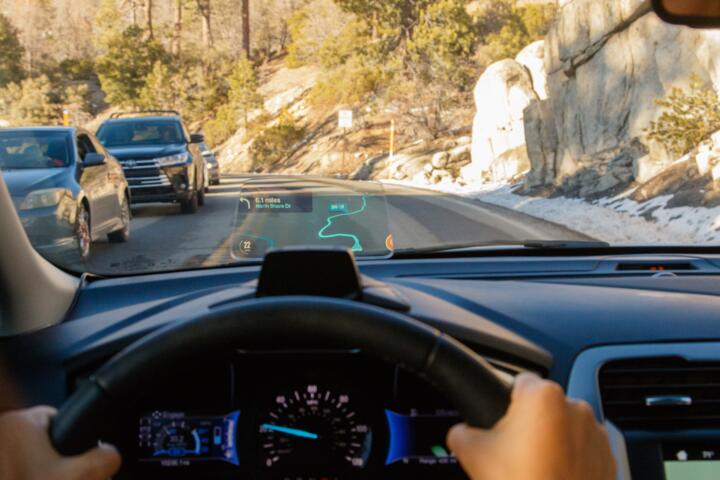
Modern Head-Up Displays have moved far beyond simple monochrome speedometers reflected on a windshield. Today’s systems utilize Thin-Film Transistor (TFT) or Digital Light Processing (DLP) projectors to overlay high-definition graphics directly onto the driver's line of sight. By keeping the driver’s eyes on the road, HUDs aim to reduce the "eyes-off-road" time, which for a standard infotainment glance averages about 2.0 seconds. At 60 mph, that is equivalent to driving 176 feet blind.
Leading manufacturers like Mercedes-Benz and BMW now utilize AR-HUDs that project virtual navigation arrows that appear to sit exactly on the physical turn in the road. Panasonic Automotive’s latest systems can track driver eye movement to adjust the projection, ensuring the image remains stable even during vehicle vibration. A 2023 study indicated that drivers using advanced HUDs responded to external hazards 0.5 seconds faster than those relying on traditional clusters.
The Optical Distance Factor
A critical technical detail often overlooked is the Virtual Image Distance (VID). High-end systems from companies like WayRay use holographic optical elements to project images at a perceived distance of 10 to 20 meters. This minimizes the "accommodation" time—the time it takes for the human eye to refocus from a distant road to a near dashboard—which significantly reduces eye fatigue during long night drives.
Critical Safety Risks
The primary failure in current HUD implementation is "Cognitive Capture." This occurs when a driver becomes so focused on the bright, high-contrast overlay that they fail to perceive real-world objects behind the data, such as a pedestrian in low-light conditions. Many manufacturers crowd the display with non-essential data, like song titles or social media notifications, which creates unnecessary cognitive load.
Improperly calibrated brightness is another major pain point. If a HUD does not have a high-quality ambient light sensor (like those provided by ams OSRAM), the display can become a blinding glare source at night or invisible in direct sunlight. Furthermore, "Ghosting"—where a double image appears because the windshield wasn't properly fitted with a PVB wedge interlayer—remains a common issue in aftermarket installations or budget factory builds.
Information Clutter Issues
When too many AR elements are active—lane departure warnings, adaptive cruise control markers, and navigation prompts—the driver’s field of view becomes a digital "soup." Research from the University of Toronto suggests that excessive HUD icons can lead to "inattentional blindness" where the brain filters out unexpected road events because it is preoccupied with processing the digital interface.
Optimizing HUD Safety
To maximize safety, HUDs must follow the "Minimalist Data Strategy." Only mission-critical information—current speed, active navigation steps, and immediate safety alerts—should be in the primary field of view. Secondary data should only appear "on-demand" or via haptic triggers. This reduces the pixels-to-road ratio and keeps the visual path clear.
The integration of LiDAR and thermal imaging is the next logical step. Systems like those being developed by Envisics use laser holography to highlight hazards that the human eye might miss. For example, if a deer is detected by the car’s night-vision sensors, the HUD can draw a subtle red box around the animal before it enters the headlights' range, giving the driver vital extra seconds to react.
Advanced Hardware Selection
Opt for systems utilizing DLP technology over standard LCD. DLP projectors, pioneered by Texas Instruments, offer much higher brightness (up to 15,000 nits) and a wider color gamut. This ensures that even in "white-out" conditions, such as driving on snow in bright sunlight, the safety warnings remain legible without the driver needing to squint or adjust their seating position.
Software Logic Implementation
Smart HUDs should implement "Contextual Filtering." If the vehicle’s CAN-bus detects a high-speed emergency braking maneuver, the HUD should instantly strip away all information except for the obstacle warning. This prevents the "distraction effect" during a crisis. Continental’s "Scenic View" HUD is a prime example, placing information at the bottom edge of the windshield to prevent blocking the direct line of sight.
Real-World Impact Cases
Logistics Fleet Optimization
A European logistics firm equipped 200 long-haul trucks with advanced AR-HUDs integrated with their telematics. The goal was to reduce navigation-related missed turns and fatigue-related incidents. By projecting route data and "Rest Time" alerts directly onto the windshield, the firm reported a 14% reduction in minor collisions over 12 months and an 8% improvement in fuel efficiency due to smoother driving patterns guided by the HUD's eco-indicators.
Premium Sedan Safety Upgrade
A Japanese luxury brand introduced a large-scale HUD with pedestrian detection overlays. In a consumer feedback study involving 1,000 owners, 88% reported feeling "more confident" during rain and fog. Data logs showed that drivers in these vehicles engaged their brakes 12% earlier on average when approaching intersections compared to models without the augmented display, directly correlating to the HUD's ability to highlight cross-traffic.
HUD Tech Comparison
| Technology Type | Image Quality | Primary Benefit | Main Drawback |
|---|---|---|---|
| Reflector (Combiner) | Low/Medium | Affordable, easy to retro-fit | Small field of view; eye strain |
| Windshield Projection | High | Natural viewing angle | Requires expensive specialized glass |
| Laser Holography | Ultra-High | True AR; infinite focus depth | High power consumption and cost |
| TFT-LCD HUD | Medium | Mature technology, reliable | Lower brightness/contrast ratios |
Common Implementation Errors
A frequent mistake is neglecting the "Auto-Brightness" calibration. Drivers often set the HUD to a static brightness level, which is dangerous as lighting conditions change. Always ensure the system uses an active photo-diode sensor to match the HUD intensity to the external environment. A HUD that is too bright at night destroys the driver's natural night vision by constricting their pupils.
Another error is the "Lower-Third Overload." While it is safer to keep icons at the bottom of the windshield, placing too much text there forces the driver to look "down" rather than "through" the glass. The sweet spot for information is 2 to 3 degrees below the driver's horizontal eye line. Any lower, and you might as well be looking at a traditional tablet or dashboard screen.
Avoiding Installation Pitfalls
If installing an aftermarket unit, never use a standard reflective film on a non-HUD windshield if you value clarity. The double-refraction of standard glass will create a blurred image. Always invest in a dedicated polarized film or, better yet, choose vehicles with factory-integrated "HUD-ready" windshields that contain a specialized wedge-shaped inner layer to align the reflections.
FAQ
Are HUDs legal in all regions?
Yes, most HUDs are legal provided they do not obstruct more than a specific percentage of the driver’s view. Standard factory systems from brands like Audi or Lexus are fully compliant with NHTSA and Euro NCAP safety standards.
Do HUDs work with polarized sunglasses?
Standard LCD-based HUDs often disappear when viewed through polarized lenses. However, newer systems using DLP or specialized optical coatings (like those from Bosch) are specifically designed to be visible even with high-end polarized eyewear.
Can HUDs be installed in older cars?
Yes, through "Combiner" HUDs like those from Hudway. These devices use a small transparent plastic screen to reflect data from a smartphone or a dedicated projector, though they lack the deep AR integration of factory systems.
Does a HUD drain the car battery?
Modern LED-backlit or Laser-based HUDs are extremely efficient, typically drawing less power than a standard infotainment screen. They have no measurable impact on the battery health of internal combustion or electric vehicles.
Can I customize what information is shown?
Most modern systems (specifically in Volvo, Ford, and Cadillac) allow deep customization via the vehicle settings menu, letting you toggle off everything except speed and navigation if you find the display distracting.
Author’s Insight
Having tested dozens of cockpit configurations over the last decade, I have found that the "cool factor" of HUDs often masks their true utility. A poorly designed HUD is a liability, but a well-calibrated AR system is the single most significant safety advancement since the backup camera. My advice: always prioritize a system with a long Virtual Image Distance (at least 7.5 meters). It’s the difference between seeing a floating sticker on your glass and having a digital guide leading you through the world. If you find yourself squinting or constantly adjusting the brightness, turn the system off until it can be professionally calibrated.
Summary
Advanced HUD systems represent a paradigm shift in how we interact with vehicular data, moving from a "glance-and-react" model to a "see-and-anticipate" workflow. While the risks of cognitive distraction are real, they can be mitigated through minimalist UI design and high-quality optical hardware like DLP projectors. To ensure maximum safety, focus on systems that offer high Virtual Image Distances and contextual data filtering. By keeping your eyes locked on the road ahead and your digital assists in the periphery, you leverage technology to enhance, rather than replace, human situational awareness.