Why mount choice matters
Phone mounts fail for predictable reasons: heat cycling, vibration, and adhesive aging. A mount that holds for 3 months in a garage can loosen after a summer in a windshield shadow. That’s why vehicle type matters more than many buyers realize.
Adhesive suction and gel pads lose grip as temperatures swing. In many regions, cars see 60–80°C cabin temps on parked days, then cool quickly after driving. That thermal cycling stresses the pad and the phone’s case edges.
Vehicle geometry changes the outcome. A compact hatchback with a steep windshield angle can work with a suction cup; a tall SUV with a dash that flexes under load often needs a different approach. A mount that blocks the defrost vent also changes windshield fogging behavior, which becomes a safety issue.
Skip the “universal” promise. It adds one more fitment variable.
Real-world usage also matters. If you drive 30–50 miles daily, you rack up thousands of vibration cycles per month. Over time, loose joints develop play, and that play turns into screen shake on rough pavement.
Common failure points
People usually buy by attachment style, not by what the mount must resist. Suction cups and adhesive pads both depend on surface cleanliness and temperature. Dash mounts also depend on whether the dash material flexes when you press a button or hit a pothole.
Skip the “tight enough” test. It hides the real problem: creep.
Consequences show up fast. A phone that drops once can crack a corner, and many cases don’t protect the camera bump. If the mount shifts, it can interfere with airbag deployment zones or block the driver’s line of sight.
In a real commute, the failure often starts as a slow slide. After 2–6 weeks, the pad may hold in the morning but loosen after midday heat. Then the phone ends up closer to the steering wheel, where cable strain increases and the charging port wears faster.
Financially, the math is simple. A replacement phone screen can cost hundreds of dollars, and a worn charging port can force a repair or replacement. Even if you avoid damage, a mount that won’t stay aligned makes navigation harder to read, which increases distraction.
Pick mounts with real fitment
Match mount to surface
Start with the surface you’ll attach to. Windshields are smooth and non-porous, but some vehicles have coatings that reduce suction reliability. Dashes vary: soft-touch plastics can flex, while hard plastics often hold adhesive better.
Test the surface with a 10-minute dry run. If the mount shifts when you press the phone mount arm, it will shift while driving. That’s not a theory; it’s a quick check.
In practice, a suction cup mount works best on clean glass. Adhesive mounts work best on stable, matte dash plastics, not on textured vinyl that sheds dust.
Tools help here. Use isopropyl alcohol (70%+), let it flash off fully, then attach and wait 30 minutes before driving. I’ve seen gel pads fail when people mount them immediately after wiping with a damp cloth.
Account for phone weight
Mount ratings often list “up to” weight, but the real stress comes from leverage. A phone with a thick case and a MagSafe-style ring can sit farther from the pivot, increasing torque on the clamp.
Skip the weight-only rating. It ignores leverage and cable pull.
Measure your phone setup. If your phone plus case is 200–250 g, and the mount grips near the center, clamp stress stays lower. If the phone sits 30–50 mm from the pivot, the mount experiences more bending moment, which accelerates joint wear.
In practice, choose a clamp that grips the sides, not the top edge. Side grip reduces the chance of camera-lens contact with the mount when you hit a bump.
Choose the right charging path
Charging cable strain is a common hidden failure. If the cable pulls downward, it can loosen a suction mount over time or peel an adhesive pad. If the cable pulls sideways, it can stress the phone’s charging port.
Use a short cable and a strain-relief loop. Route it so the cable has slack at full steering lock. That one detail reduces port wear, and it keeps the mount from fighting the cable every time you turn.
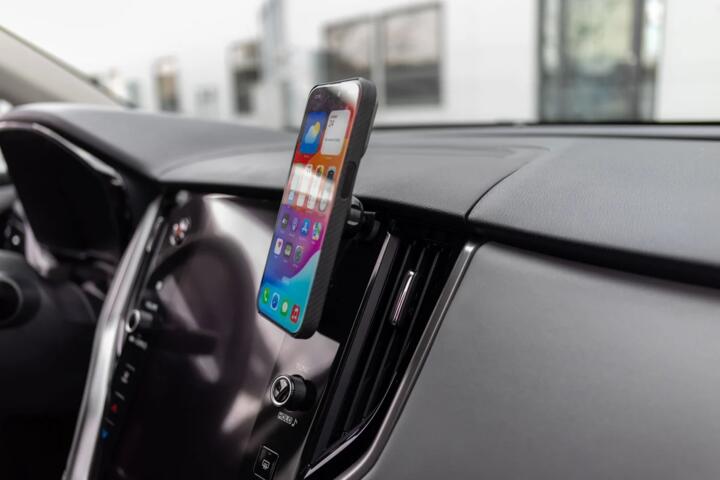
For vehicles with USB ports near the console, a vent mount can keep the cable short. For vehicles with ports in the dash, a dash mount may reduce cable bend radius.
On a 12V system, charging current can vary by phone model and cable quality. If your phone throttles charging during heat, you’ll notice it as slower charging on long drives, which changes how often you touch the mount.
Control vibration and shake
Vibration is worse on rough roads and on vehicles with higher body motion. A pickup with 33-inch tires and a lifted suspension transmits more high-frequency shake than a low sedan on smooth pavement. Even within the same model line, tire pressure changes the vibration profile.
Skip the “rigid mount” assumption. Stiff mounts can transmit more shock to the phone.
Look for mounts with a damped joint or a stable base that doesn’t wobble. In practice, you should be able to tap the phone lightly and see minimal movement at the screen.
For road-trip comfort, consider where the mount sits relative to the windshield. A mount too low can reflect sunlight into the camera and screen, and it can also interfere with the wiper sweep.
Plan for heat and sun
Heat affects adhesives, plastics, and friction pads. A mount that survives winter mornings can still fail after repeated summer parking cycles. If you park outside, choose attachment methods that tolerate thermal cycling.
Skip the “works in winter” test. It doesn’t predict summer creep.
In practice, suction cups often hold better on glass than on painted surfaces. Adhesive pads can last longer when you clean the surface and avoid mounting on curved, flexible trim.
Check the mount’s temperature range in the product documentation. If it lists a narrow range, treat it as a warning, especially for vehicles that bake in direct sun.
Verify safety and airbag clearance
Mount placement matters for safety. A mount that blocks vents or sits where a curtain airbag deploys can create both visibility and safety risks. Even if the mount doesn’t move, it can become an obstruction during a crash.
Use the vehicle manual as your reference. Compare the mount location to airbag deployment zones and keep the mount low enough to avoid interfering with the driver’s side curtain.
In a 2018–2021 compact SUV, for example, the curtain airbag often runs along the roof edge and deploys downward. A mount mounted high on the A-pillar area can end up in the deployment path.
When in doubt, mount to the windshield glass or center stack area, not the A-pillar trim.
Test fit before committing
Fitment errors are the fastest path to a short lifespan. A mount that sits at the wrong angle can force you to tighten the clamp harder, which wears the hinge. A mount that blocks the climate controls can lead to frequent adjustments while driving.
Skip the “it’ll adjust” belief. Adjustment mechanisms wear first.
Do a 24-hour test at home. Mount it, insert the phone, then gently shake the phone by hand. If you hear clicking or feel looseness, return it before it becomes a habit.
For tools, a small level app on your phone helps you set consistent viewing angle. I’ve used version 1.8 of a basic inclinometer app to set the mount so the screen stays readable without tilting your head.
Mini case: fleet phones
A delivery company ran 40 vans with suction-cup mounts on windshields. After 6–8 weeks, drivers reported mounts sliding during summer routes, and 12 phones needed screen repairs over a quarter. The average repair cost was about $220 per phone, plus downtime for replacement devices.
The company switched to dash mounts with gel pads rated for higher temperature cycles, and they standardized cable routing with short leads and strain relief. They also required a 30-minute cure time after installation, which, frankly, most drivers skipped at first.
Result: mount failures dropped from 12 phones per quarter to 3, and screen repair costs fell to about $60 per quarter. They also saw fewer “phone not charging” complaints, which reduced driver time spent troubleshooting.
That’s not magic; it’s fewer variables. Heat, cure time, and cable strain were the dominant causes.
Mini case: family road trips
A family with a 2.0L turbo crossover used a vent mount because it looked neat. On a 700-mile road trip, the mount loosened after repeated cabin heat cycles, and the phone slid low enough to block part of the climate display. The driver kept readjusting at stops, which increased cable wear.
They replaced the vent mount with a windshield mount that used a stable base and a side-grip holder. They also changed to a 0.5–1.0 m cable with a right-angle connector to reduce bending at the port.
Result: the mount stayed fixed across the trip, and the family stopped adjusting it during fuel stops. Over the next 3 months, they reported no charging-port issues and fewer instances of the phone falling during pothole hits.
Road-trip comfort improved because the screen stayed in the same spot, not because the mount looked better.
Mount checklist and table
| Mount type | Best for | Common failure | Longevity tip |
|---|---|---|---|
| Suction cup | Clean windshield glass | Heat creep, dirty glass | Clean with alcohol, wait 30 min |
| Adhesive gel | Stable dash plastics | Pad aging, surface oils | Cure time, avoid textured trim |
| Vent clamp | Short cable routes | Slat flex, vibration | Check vent slat material, don’t over-tighten |
| Magnetic | Quick phone swaps | Case thickness, heat | Use correct ring thickness, keep cable slack |
Checklist: confirm surface type, phone weight with case, cable routing, airbag clearance, and viewing angle. Then do a 24-hour home test before relying on it for daily driving.
Common mistakes and fixes
Mounting on dusty trim
Why it happens: people wipe quickly and attach immediately, leaving dust film. Impact: adhesive loses shear strength and creeps after heat soak. Avoid it: clean with 70%+ isopropyl alcohol, let it dry fully, then attach and wait 30 minutes before driving.
Over-tightening the clamp
Why it happens: the phone feels loose, so the user tightens until it stops moving. Impact: hinge wear accelerates and the mount loosens later. Avoid it: choose a clamp that matches your phone’s case thickness, and verify side grip without forcing the hinge.
Ignoring cable strain
Why it happens: cable routing looks fine at the start, then changes with steering and seat movement. Impact: port wear and mount loosening. Avoid it: route the cable with slack at full steering lock and use a short lead to reduce bending at the connector.
Blocking vents or controls
Why it happens: mounts get placed where the phone “fits,” not where airflow and controls remain usable. Impact: windshield fogging increases, and drivers adjust the mount more often. Avoid it: keep the mount clear of defrost vents and climate controls, and check visibility with the wipers running.
Choosing a one-size-fits-all arm
Why it happens: universal arms promise compatibility across phones and vehicles. Impact: the phone sits too far from the pivot, increasing torque and shake. Avoid it: match the mount’s arm length and head style to your phone size and the dash/windshield geometry.
FAQ
How do I stop a suction mount from slipping?
Clean the glass with isopropyl alcohol and let it fully dry. Attach the mount, then wait at least 30 minutes before driving so the pad seals. If it still slips, check for a windshield coating or tint that reduces suction. Also verify that the mount head is tightened to the correct position; a slightly misaligned arm can create a constant sideways load that breaks the seal. If you park in direct sun, consider a gel-pad dash mount or a mount designed for higher temperature cycling.
Do vent mounts last longer than dash mounts?
Vent mounts can last a long time when the vent slats are rigid and the clamp isn’t over-tightened. They often fail when the vent slats flex under vibration or when the phone weight creates a constant twisting load. Dash mounts can last longer on stable dash plastics, but adhesive mounts depend on surface cleanliness and cure time. If your vehicle’s vents are shallow or angled, a vent mount may wobble even when it feels secure. A quick home test—insert the phone and shake gently—reveals wobble before it becomes a problem.
What phone case thickness affects mount reliability?
Case thickness changes both clamp grip and magnetic coupling. For clamp mounts, thicker cases can push the phone farther from the pivot, increasing torque and making the hinge loosen sooner. For magnetic mounts, a thick case can reduce the magnetic pull and increase drop risk on bumps. Measure your case thickness with calipers if you have them, or compare with the mount’s stated compatibility range. If the mount requires “extra tight” settings to hold, that’s a sign the case and mount geometry don’t match.
Where should I mount it for safety and visibility?
Keep the mount out of airbag deployment zones and avoid blocking defrost vents or the driver’s view of key indicators. Many vehicles place curtain airbags along the roof edge, so avoid mounting high on A-pillar trim. For visibility, set the phone so you can read it without tilting your head, and check glare at different times of day. If you drive at night, confirm the mount doesn’t reflect directly into the windshield. When in doubt, use the vehicle manual’s airbag diagrams as your reference.
How often should I replace an aging mount?
There’s no universal mileage interval, but you can use behavior as a trigger. Replace or re-seat the mount when you see pad creep, increased wobble, or the need to tighten the hinge more than before. Adhesive mounts often degrade after repeated heat cycles, especially if the car sits in sun. If the mount has been removed and reattached multiple times, adhesive strength can drop even if it looks clean. A practical approach: inspect monthly, then plan replacement after a summer season if it shows any slippage.
Author's Insight
Phone mounts fail less from “bad luck” and more from predictable loads: heat cycling, vibration, and cable strain. A mount can look secure while parked, then loosen after hours of sun because adhesive and friction materials change properties with temperature. Vehicle interior geometry matters too; dash flex and vent slat design change how forces travel into the mount. If you treat installation like a small engineering problem—cleaning, cure time, cable routing—you usually get longer service life.
Skip the assumption that a mount that works once will keep working through a full season. The first sign is often subtle: screen shake, slow pad creep, or a charging cable that suddenly feels tight.
Key takeaways
Choose a mount based on your vehicle’s surface type, your phone’s weight with case, and cable routing, not just the attachment style. Do a 24-hour home test and wait 30 minutes after adhesive installation before driving. Expect heat to shorten the life of pads and friction joints, especially with frequent sun exposure.
Next step: measure your phone setup, check airbag clearance using the vehicle manual, then route a short cable with slack at full steering lock. If the mount still slips after proper cleaning and cure time, replace it rather than tightening harder.
Limits: this guide can’t predict every vehicle interior or windshield coating. If you notice the mount interfering with airbags, obstructing defrost, or causing repeated screen damage, stop using it and seek professional advice from a qualified installer or the vehicle dealer’s service department.