How Driver-Assist Works
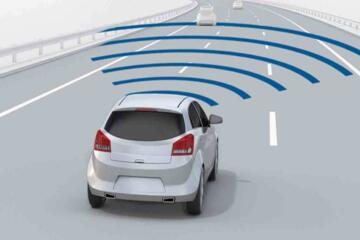
Driver-assist systems use cameras, radar, and sometimes lidar to watch the road and act on steering, braking, and speed. They are not “autopilot” in the legal or practical sense; they are driver support with strict boundaries. A common example is automatic emergency braking, which can detect a vehicle ahead and apply the brakes if you do not react in time.
In the U.S., the National Highway Traffic Safety Administration has reported that forward-collision warning and automatic emergency braking can reduce rear-end crashes, with effectiveness varying by vehicle and scenario. Lane-keeping and lane-centering systems also exist, but their performance depends heavily on lane markings and camera calibration.
Skip the marketing videos. They show clean lanes and perfect weather.
Vehicle type matters more than many buyers realize because sensor placement and road geometry change the job. A low-slung sedan sees lane lines differently than a tall SUV, and a pickup with a higher hood line changes how obstacles appear in the camera view. Even tire size and suspension height affect how quickly the car pitches and how stable the camera image stays during braking.
For numbers, consider that adaptive cruise control typically uses radar to hold a set distance, often down to low speeds depending on the system. Many systems also cap steering assist to lane boundaries and may disengage if the driver does not keep hands on the wheel. Some cars offer traffic-jam assist that can follow slower traffic at crawl speeds, but it still expects driver supervision.
Real-world usage is also tied to speed. At 60 mph, a 1-second delay is about 88 feet of travel, so “late” braking can still be too late even with automatic systems. That distance is why these features are designed to help, not to replace reaction time.
Where People Get Burned
People get wrong expectations in two directions: they assume the car will handle edge cases, or they assume the system will never help. Both lead to risky behavior. The first mistake is treating lane centering as a substitute for lane discipline, especially on roads with faded lines, construction zones, or glare.
The second mistake is trusting adaptive cruise on every surface. Radar can struggle with certain targets, including motorcycles, bicycles, and vehicles with unusual shapes, and it can also misread stationary objects. When the system loses the target, it may coast or brake unexpectedly, which surprises drivers who are not ready to take over.
Skip the “set it and forget it” habit. It breaks down when sensors lose the plot.
Consequences show up as near-misses, hard braking, and last-second steering corrections. In a parking-lot scenario, automatic emergency braking may not trigger if the object is low, narrow, or outside the sensor’s field of view. In a highway scenario, lane centering may disengage when the camera cannot see lane lines, forcing a manual takeover at the worst moment.
Financial impact follows the safety risk. A collision can erase years of depreciation savings, and repairs for sensor-calibration work can be expensive. Many shops charge for recalibration after windshield or camera-related repairs, and the labor time can be significant because the system must be verified against factory targets.
Ownership costs also change with complexity. A vehicle with more sensors and cameras may require more careful windshield replacement, and some insurance policies treat calibration as part of the repair process. Resale value can also be affected if a car has had major front-end work, even when it drives straight afterward.
What to Do, with Specifics
Test braking behavior first
What to do: In a safe, controlled area, practice how automatic emergency braking behaves at low speeds and moderate approach angles. Why it works: you learn the system’s threshold for warning versus braking, which varies by model and software version. What it looks like: you may get a visual alert, then a brake pulse, then stronger braking if you do not intervene. Tools: use the car’s driver-assist settings menu and check for “sensitivity” levels, then record what changes. Outcome target: you want predictable behavior, not surprises when a target appears suddenly.
Skip the “max sensitivity” setting. It can brake for false targets.
Verify lane centering limits
What to do: Drive on a road with clear lane markings and then repeat on a road with worn lines or temporary paint. Why it works: lane centering depends on camera contrast and lane geometry, so performance drops when markings fade. What it looks like: the system may reduce steering assist or disengage, and the steering wheel may require more active input. Tools: check the owner’s manual for the system’s disengagement triggers and whether it supports hands-free steering. Outcome target: you should be able to predict when it will stop helping.
Try it at 45 mph. Markings matter more then.
Set adaptive cruise distance
What to do: Choose a following distance that matches your comfort and your typical traffic flow. Why it works: adaptive cruise uses your selected gap, and a shorter gap can lead to late braking when traffic compresses. What it looks like: the car may brake harder when the lead vehicle slows quickly, especially on hills. Tools: use the distance buttons on the steering wheel and compare behavior on flat versus rolling roads. Outcome target: fewer “why did it brake?” moments.
Understand radar target issues
What to do: Pay attention when you approach motorcycles, cyclists, or vehicles that cut in from adjacent lanes. Why it works: radar returns can be weak on small or fast-moving targets, and the system may not classify them correctly. What it looks like: the car may delay acceleration, hold speed longer than expected, or briefly lose the target. Tools: turn on the driver-assist display so you can see what the car is tracking, then note when the icon disappears. Outcome target: you learn to take over early instead of waiting for a warning.
Do not assume it sees bikes. It often does not.
Check sensor cleaning habits
What to do: Keep the camera area and radar cover clean, especially after winter road spray. Why it works: a dirty lens can reduce contrast and increase false lane detection or missed lane lines. What it looks like: lane centering may disengage more often, and warnings may appear even when the road is clear. Tools: use a microfiber cloth and follow the manual’s guidance for cleaning; avoid harsh solvents on camera housings. Outcome target: fewer random disengagements during rain or slush.
In my shop notes, salt film lingers. It ruins contrast fast.
Plan for calibration costs
What to do: Before replacing a windshield or doing front-end body work, ask the repair shop whether they will recalibrate the camera and radar as required. Why it works: misalignment can cause lane drift warnings, incorrect distance control, and inconsistent braking. What it looks like: after a repair, the system may behave differently until calibration is complete. Tools: request documentation of calibration steps and confirm the correct target procedure. Outcome target: you avoid repeat visits and you protect resale value.
Ask for the calibration printout. It matters later.
Use the right settings for weather
What to do: Adjust driver-assist sensitivity when rain, snow, or fog changes visibility. Why it works: traction and sensor detection both change, and stability control may intervene differently. What it looks like: the system may reduce intervention or disengage more frequently on slippery roads. Tools: check whether the car has separate modes for rain or low-visibility driving, and test in a safe area. Outcome target: fewer abrupt interventions that feel “wrong” to the driver.
At 30 mph in heavy rain, expect more disengages. That’s normal.
Know what it cannot do
What to do: Treat driver-assist as a partial automation that still requires full attention. Why it works: systems cannot reliably handle construction workers, unusual debris, glare, or unmarked roads. What it looks like: the car may not brake for a low object, may drift when lane lines disappear, and may not recognize a stopped vehicle in a shadowed area. Tools: disable features that you cannot supervise, and keep your hands ready even when the car is “helping.” Outcome target: you avoid over-trusting the system during the exact situations where it is weakest.
Skip the “hands off” test. It teaches bad habits.
Fleet Follow Distance Case
A regional delivery company ran 28 vehicles with adaptive cruise and lane centering. The problem was not total system failure; it was driver complaints about late braking and occasional disengagement during construction detours. The fleet manager standardized following distance settings, required a short training session on disengagement behavior, and added a windshield-cleaning checklist for routes with heavy road spray.
After 60 days, the company reported a reduction in “hard brake” events logged by the telematics system from 14 per 1,000 miles to 9 per 1,000 miles. They also saw fewer lane-centering dropouts in wet conditions after drivers started cleaning the camera area more consistently. The vehicles still disengaged when lane lines vanished, but drivers took over earlier, which reduced abrupt steering corrections.
Costs stayed predictable because the fleet avoided repeat repairs by scheduling recalibration after two windshield replacements. That avoided a second calibration visit that had happened in an earlier quarter on a different vehicle line.
EV Charging and Alerts Case
An EV buyer used driver-assist heavily on commutes and planned road trips around charging stops. The problem was not the driver-assist itself; it was expectation mismatch when the car’s navigation and driver-assist prompts competed for attention during charging-route changes. The driver found that last-minute reroutes and charger availability updates caused distraction right when they needed to supervise lane centering and adaptive cruise in unfamiliar traffic.
They fixed it by setting a charging plan the night before, then disabling non-critical alerts while driving to the charger. Over three road trips, they reported fewer “missed takeover” moments during lane-centering transitions in construction zones near the destination. The driver also learned to treat low-speed traffic assist as a supervised feature, not a substitute for scanning mirrors.
That case highlights a practical point: driver-assist performance depends on the driver’s attention, and attention is a finite resource during navigation changes.
Buy and Use Checklist
| Item | What to check | Why it matters | Quick test |
|---|---|---|---|
| Lane centering | Disengagement behavior on faded lines | Camera contrast limits steering assist | Drive past a construction detour |
| Automatic braking | Warning-to-brake threshold | Threshold varies by model and speed | Practice at 20–30 mph |
| Adaptive cruise | Following distance and target loss | Radar can lose targets in edge cases | Observe behavior when a car cuts in |
| Calibration plan | Windshield and sensor recalibration steps | Misalignment can cause repeated alerts | Ask the shop about documentation |
| Warranty and coverage | What’s covered after sensor damage | Coverage varies by component and cause | Read the bumper-to-bumper terms |
Common Mistakes and Fixes
People assume lane centering works on any road. It happens because the system looks stable on highways with clean lines. The impact is delayed takeover when markings disappear. Avoid it by testing on a route with worn paint and noting the exact moment it disengages.
People crank up sensitivity to reduce warnings. It happens because false alerts feel worse than missed help. The impact is stronger braking for stationary objects or shadows. Avoid it by setting a moderate level and using the display to see what the car is tracking.
Skip the “hands-free” habit. It teaches you to stop scanning.
People treat adaptive cruise like a full driver. It happens because the car holds speed and distance smoothly most of the time. The impact is surprise when the target disappears or when a motorcycle cuts across. Avoid it by keeping your eyes on the lane and mirrors, and by planning a takeover when traffic gets weird.
People ignore sensor cleaning. It happens because the car still drives normally until contrast drops. The impact is more disengagements and more false warnings in rain or winter spray. Avoid it by adding a 30-second wipe to your routine when you stop for gas.
People skip calibration questions after repairs. It happens because the car drives straight immediately after a windshield job. The impact is inconsistent driver-assist behavior weeks later. Avoid it by asking for recalibration documentation and confirming the system passes its self-check.
FAQ
Can driver-assist drive in snow?
Most driver-assist systems reduce intervention or disengage in low-visibility conditions, even when the car remains stable. Cameras can struggle with snow spray and glare, and radar can misread targets when the road surface is uneven. Traction control also limits how aggressively the car can brake or steer. If you use these systems in snow, set a longer following distance, expect more disengagement, and keep your hands ready for immediate takeover. If the system repeatedly drops out, treat that as a signal to drive without it on that route.
Why does lane centering quit suddenly?
Lane centering typically quits when the camera cannot reliably detect lane boundaries, when the road curves beyond the system’s steering envelope, or when the vehicle’s stability behavior changes. Construction zones, faded paint, and glare from wet pavement are common triggers. Some systems also require periodic steering-wheel input; if you rest your hands loosely, the car may interpret it as inattentiveness. Check the owner’s manual for the specific disengagement logic and test on a familiar road after a rainstorm. If disengagement is frequent on clear roads, inspect windshield condition and camera cleanliness.
Does automatic emergency braking work for pedestrians?
Many vehicles include pedestrian detection, but performance depends on speed, lighting, and the pedestrian’s size and motion. A system may detect a person in a crosswalk but miss a smaller figure near the curb, especially at night or in heavy rain. It also may not react the same way for a child-sized target. The safest approach is to treat it as a last-resort mitigation, not a guarantee. During test drives, ask the dealer about the system’s detection categories and review the manual’s limitations for low-speed versus highway scenarios.
Will these systems reduce insurance costs?
Insurance pricing varies by insurer, driver history, and vehicle model, so there is no universal rule. Some insurers may offer discounts for advanced safety features, while others price mainly on crash statistics and repair costs. The repair cost angle matters because sensor calibration and camera-related parts can raise claim severity. If you are shopping, request quotes for two similar trims with different driver-assist packages. Use the same deductible and coverage limits so the comparison stays meaningful.
What should a new driver do first?
Start with a conservative setup: keep adaptive cruise distance longer, avoid the most aggressive sensitivity settings, and learn the exact warning style before relying on braking or steering assist. Practice disengagement behavior on a quiet road so the driver knows what it feels like when the system stops helping. Teach a simple rule: driver-assist is active only while the driver is actively scanning mirrors and the lane ahead. If the car offers hands-on monitoring, follow it strictly; ignoring it can lead to sudden disengagement. After any windshield or front-end repair, confirm recalibration was completed.
Author's Insight
Driver-assist systems are best treated like a second set of eyes with limited vision, not like a replacement for scanning. In repair work and fleet observations, the biggest performance swings come from sensor cleanliness, calibration quality, and road marking visibility. The systems often behave predictably on clean highways, then become inconsistent in construction zones, glare, and wet spray. A practical approach is to learn each system’s disengagement pattern and keep settings conservative until you understand how it reacts in your routes.
When you buy, read the manual section on limitations and check whether the car supports recalibration after windshield replacement. That single detail affects ownership cost and how reliable the assist feels months later.
Key Takeaways
Driver-assist can reduce workload with features like adaptive cruise and automatic emergency braking, but it cannot handle every road edge case. It often struggles with faded lane lines, unusual targets, glare, and low-contrast scenes, and it can disengage without warning. Next step: during a test drive, verify braking thresholds, lane-centering disengagement, and target-loss behavior on roads that resemble your commute. If you plan windshield or front-end repairs, ask the shop about sensor recalibration and request documentation.
Benefits include fewer late reactions in routine traffic, but limits remain at the edges of sensor detection. If you see repeated false warnings or frequent disengagement on clear roads, schedule a diagnostic check rather than assuming it will “learn.” For any collision, injuries, or near-miss with trauma risk, seek medical advice promptly and follow local emergency guidance.