What AR HUDs display
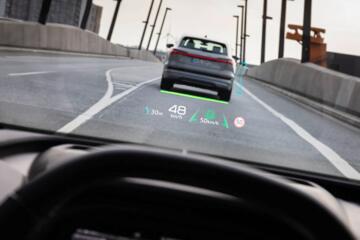
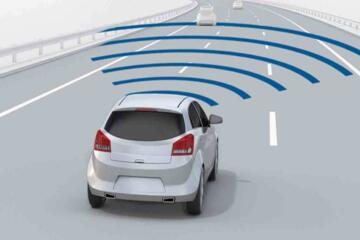
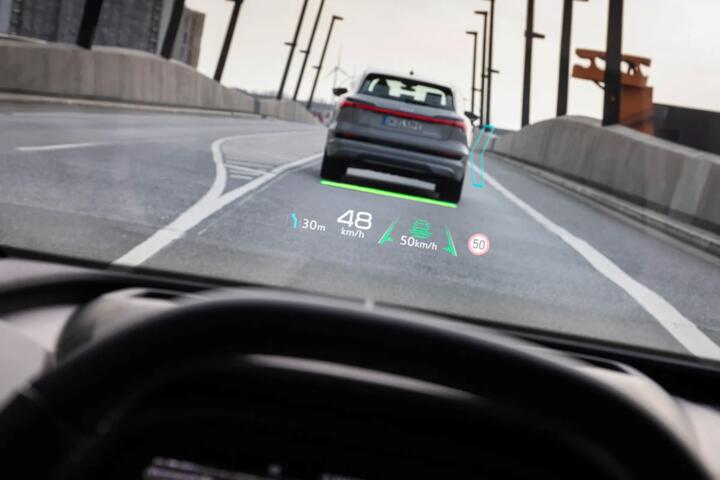
AR head-up displays overlay graphics onto the road view using a camera, vehicle sensors, and a projector. A common setup uses a forward camera plus radar or lidar for distance estimates, then draws lane-level cues at a fixed depth. In many systems, the projected content sits around 2–3 meters ahead, not on the far horizon.
Skip the “floating icons” assumption. They rarely match the real world unless the calibration is correct. In practice, the system anchors graphics to lane markings and the vehicle’s yaw and pitch, then updates at video frame rates.
Vehicle type changes the display behavior. A low hood and wide windshield on a sedan can give the camera a cleaner view of lane lines than a tall SUV with thicker A-pillars. That difference affects how often the HUD can lock onto lanes for turn arrows and lane-change prompts.
Two industry facts frame the problem. First, windshield HUDs typically use a combiner angle that limits brightness and contrast in direct sun. Second, many driver-assistance stacks rely on camera lane detection, which degrades when lane lines are worn, covered by snow, or obscured by construction cones.
Real-world examples help. A navigation turn arrow may appear near the lane you should take, while a speed-limit sign may show as a small icon with a numeric value. Some systems also show adaptive cruise status, such as a following-distance bar, and collision warnings as a red outline near the projected path.
Common pain points
People get the display wrong in three predictable ways. They assume the HUD “knows” the road like a human, they assume the overlay stays accurate in every weather, and they assume the system always uses the same depth cue.
Skip the “it’s always correct” mindset. The overlay can drift when the camera view changes. A dirty windshield, a cracked corner of the glass, or a new windshield after replacement can shift the camera-to-projector alignment.
Why it matters shows up fast. If lane guidance appears one lane over, the driver has to re-check mirrors and signage, which adds cognitive load. If a speed-limit icon lags behind the actual sign, the driver may brake earlier or later than intended.
Consequences can be financial. A HUD option often ties into the same sensor suite used for driver-assistance features, so a calibration or sensor replacement can cost more than a simple infotainment repair. Repair frequency depends on the vehicle and region, but windshield replacement and camera recalibration are common service items after glass damage.
Real-world situations are usually mundane. Construction zones with temporary lane markings can cause the system to stop projecting lane-level cues. Night driving with glare from oncoming headlights can reduce contrast, and the HUD may fall back to simpler symbols.
Ownership costs also show up in software behavior. Some AR HUD features depend on map data and firmware versions, so a used vehicle may not match the feature set advertised when it was new. That mismatch is frustrating, especially when the car’s display looks “there” but guidance quality is lower.
What to check before buying
Depth cues and anchoring
Check how the system anchors graphics to the road. It should lock to lane lines and keep turn arrows aligned as you change lanes slowly in a safe area. Depth cues matter because a projected icon that appears too far ahead can mislead braking timing.
Ask the dealer to demonstrate with lane markings visible. If the HUD only shows generic arrows, the system may be falling back from lane-level anchoring. On many vehicles, the HUD draws at a fixed depth range, often around a few meters, so it will not “stick” to every object.
Look for a HUD status indicator in the instrument cluster. Some cars show whether lane guidance is active or unavailable, which helps you understand why the overlay changes. I’ve seen owners blame the HUD when the real issue was the lane-detection mode dropping out—usually after windshield glare or a dirty camera window.
Brightness in sun and glare
Test the HUD in direct sunlight if possible. Brightness and contrast determine whether the projected text stays readable when the windshield is reflective. Many HUDs use a limited projector output, so the image can wash out at certain angles.
Skip the “it looks fine at night” test. Daytime readability is the harder case. If the system uses a headlamp-based auto-dimming profile, it may still struggle when the sun is low and hits the combiner.
Bring a simple reference. If the HUD text becomes unreadable before you can read the speed on the cluster, the system will add work during highway merges. That’s not a theoretical issue; it shows up during summer commutes.
Sensor coverage and weather
Verify what the car does when lane lines disappear. In heavy rain, snow, or construction zones, the AR HUD often reduces to simpler warnings or stops projecting lane-level guidance. That behavior is tied to camera lane detection quality.
Ask about windshield requirements. Some systems need a specific windshield type or coating for the camera and projector alignment. After a windshield replacement, recalibration may be required, and the service time can be a day depending on parts availability.
In practice, the HUD may still show collision warnings using radar, but it may not show lane arrows. That split behavior is common across camera-driven AR HUD designs.
Firmware and feature availability
Confirm the vehicle’s software version and whether AR HUD features are enabled. Some functions depend on map updates and driver-assistance firmware, so a used car can have a different menu layout than the brochure. A dealer can often check the current build number during a service visit.
Skip the “it’s the same hardware” assumption. Feature flags can differ by model year and trim. If the HUD supports turn-by-turn lane guidance only on certain packages, you may see icons but not the full overlay.
When you test-drive, watch for what appears during navigation reroutes. If the system only draws a generic arrow after a recalculation, the AR layer may be limited.
Interaction with driver-assist
Check how AR HUD content changes with adaptive cruise and lane centering. Many systems project a following-distance indicator and lane status, then suppress certain graphics when the driver-assist system is inactive. That reduces clutter, but it can also hide useful cues.
Ask the dealer to demonstrate in a controlled setting. For example, set adaptive cruise to a moderate speed and observe whether the HUD shows a distance bar while the car tracks the lane. If the HUD only shows warnings after a threshold, you may miss early cues.
On some vehicles, the HUD content competes with other overlays like blind-spot alerts. You want to know which one wins, because that affects glance behavior.
Readability for children and passengers
Evaluate how the HUD affects cabin visibility. The projected image is on the windshield, so it can reflect into the cabin under certain angles. That matters for rear-seat passengers and for child-seat positioning, since glare can increase when the sun is low.
Check child-seat compatibility indirectly. If the HUD reflection makes the rearview mirror glare worse, you may need to adjust mirror position and shade use. Also confirm that the front passenger can still see the instrument cluster and climate controls without fighting reflections.
In a family car, the HUD should not force extra head turns. If you notice drivers leaning forward to read the projected text, the system may not be tuned for that seating position.
Maintenance and calibration costs
Plan for calibration after windshield work. Camera-based AR HUDs often require a calibration procedure after glass replacement, and the labor time can be non-trivial. Ask for the expected recalibration steps and whether the service includes a target alignment check.
Skip the “wipe it and forget it” approach. A HUD depends on a clear camera view, so windshield cleaning habits matter. If you use harsh coatings or abrasive wipers, you can degrade optical clarity and reduce lane detection.
Also check warranty coverage. Some warranties cover calibration and sensor replacement, but coverage varies by region and by whether the windshield damage is considered wear or impact.
Road-trip behavior and navigation depth
Test the HUD during a longer navigation segment. Turn-by-turn overlays can change depth and size as the car approaches an exit, and that can affect readability at highway speeds. A good system keeps the text stable and avoids rapid flicker.
Use a real route with multiple turns. For example, a 30–60 minute drive with at least two highway exits shows whether the HUD keeps projecting lane arrows or falls back to a simpler display. I’ve seen systems switch modes after a map recalculation, which looks like “bugs” to the driver.
Watch for how the HUD handles reroutes. If the overlay updates late, you may rely on the center display instead, which defeats the point of keeping eyes forward.
Mini case studies
A fleet operator with 42 vehicles added AR HUDs to a mix of compact sedans and midsize SUVs. The problem was inconsistent lane-level guidance in winter, with overlays disappearing after slush splatter. They switched to a windshield washer fluid with winter-grade additives, increased wiper blade replacement intervals, and required a quick camera-area wipe during routine inspections.
Result: lane-level projection stayed active about 15–20% more often during the first 2 weeks after service, based on internal driver logs. They also reduced “HUD not working” service tickets by roughly a third, mostly because the camera view was cleaner. The operator still saw dropouts in construction zones, but drivers reported fewer late lane corrections.
Another case involved a dealership used-car program. They found that some AR HUD features were disabled on certain model years due to incomplete software updates. The fix was a standardized update check during reconditioning, including map and driver-assistance firmware.
Result: the program estimated a 5–8% reduction in customer complaints tied to navigation overlays. The cost was mainly technician time, roughly 0.5–1.0 hour per vehicle depending on update size, and it prevented repeat visits.
Checklist for real use
| What to check | What good looks like | What to watch for | Why it matters |
|---|---|---|---|
| Lane anchoring | Turn arrows align with the lane | Icons float or disappear in clear lanes | Depth errors increase glance time |
| Daytime readability | Text stays legible in sun | Washout at certain angles | You’ll rely on the cluster instead |
| Weather fallback | Clear status when guidance drops | No warning, then sudden changes | Unexpected mode shifts distract |
| Calibration after glass | Recalibration documented | No mention of camera alignment | Overlay accuracy depends on alignment |
| Software version | AR features match the trim | Missing menu items or partial overlays | Used cars may lag updates |
Common mistakes and fixes
Assuming the HUD replaces the driver’s attention is the first mistake. It projects cues, not a complete picture. Avoid it by treating the HUD as a secondary layer and confirming with mirrors and signs.
Skip the “clean windshield always” belief. People often clean the center of the glass and miss the camera’s view area. Wipe the camera zone and the windshield edges where glare builds, which frankly most people skip.
Another mistake is ignoring the mode status. When lane guidance drops, the system may switch to simpler icons. Avoid it by watching for status indicators and learning what “inactive” looks like on your specific vehicle.
Some buyers also overpay for AR HUD without checking trim compatibility. A car can have the projector hardware but lack lane-level navigation overlays. Avoid it by verifying the exact feature list on the window sticker or build sheet.
Finally, people forget that windshield replacement can change alignment. If the HUD looks slightly off after glass work, don’t keep driving and hoping it settles. Ask for a calibration check, because the projector-camera relationship can drift.
FAQ
What does an AR HUD show?
Most AR HUDs show lane-level navigation cues, such as turn arrows and lane guidance, plus driver-assistance status like adaptive cruise distance. Many also display speed-limit information when the car’s map and camera system agree. The exact content depends on the sensor suite and the software version, so two cars with “AR HUD” can show different overlays. During a test drive, watch for what appears during navigation reroutes and lane-centering activation.
How does the HUD place graphics on the road?
The system estimates vehicle position and road geometry using a forward camera and vehicle motion sensors. It then projects graphics at a depth that matches the lane or guidance path it has detected. If lane markings are faint, covered, or the camera view is blocked, the system may reduce accuracy or stop projecting lane-level cues. After windshield replacement, recalibration can be required, and misalignment can make overlays appear shifted.
Why does AR HUD fail in rain or snow?
Rain and snow affect camera contrast and lane-line visibility. Wipers, water droplets, and slush can blur the camera view, which reduces lane detection confidence. In those conditions, the HUD may fall back to simpler warnings or hide lane-level guidance. You can reduce failures by keeping the windshield optics clean and using correct wiper blades for the season, but the system still depends on what the camera can see.
Does AR HUD affect insurance or repair costs?
Insurance impact varies by insurer and region, but HUD-equipped cars can cost more to repair after windshield damage because calibration and sensor checks may be required. Some claims involve glass replacement plus camera calibration, which can increase labor and parts costs. Ask your insurer for a quote difference using the exact trim and options, and ask the body shop whether they perform the manufacturer calibration procedure. Warranty coverage also varies, so check the terms for glass and sensor-related work.
Is AR HUD safe for night driving?
Night safety depends on readability and how the system handles glare. Many HUDs dim or adjust brightness, but contrast can still drop when oncoming headlights reflect off the windshield. The HUD should show warnings without forcing the driver to look away from the road for long. Test it during a dusk drive if possible, and confirm whether the system suppresses certain overlays when glare or lane detection confidence falls.
Author's Insight
AR HUDs are not just a display upgrade; they depend on camera lane detection and calibration. When the camera view degrades, the overlay often changes depth accuracy or disappears, which is why windshield condition and sensor alignment matter. I’ve seen fleet and dealership workflows treat AR HUD complaints as “diagnostics first,” then cleaning and calibration, before any hardware replacement.
Software updates also change behavior. A used vehicle can have partial AR features if map or driver-assistance firmware lags, so checking the build and update history reduces surprises.
Key takeaways
AR HUDs project navigation and driver-assistance cues onto the windshield view using camera-based road understanding. The overlay quality depends on lane visibility, calibration after windshield work, and daytime readability under glare. Next step: test the HUD during navigation with visible lane lines, then repeat the test in bright sun angles if you can.
Benefits include reduced glance time when the graphics stay aligned with the lane path. Limits include mode dropouts in construction zones and reduced contrast in glare, plus potential extra repair cost after windshield damage. If you notice persistent misalignment after glass replacement, seek a calibration check through an authorized service center rather than waiting for “it to correct itself.”