From distance to prediction
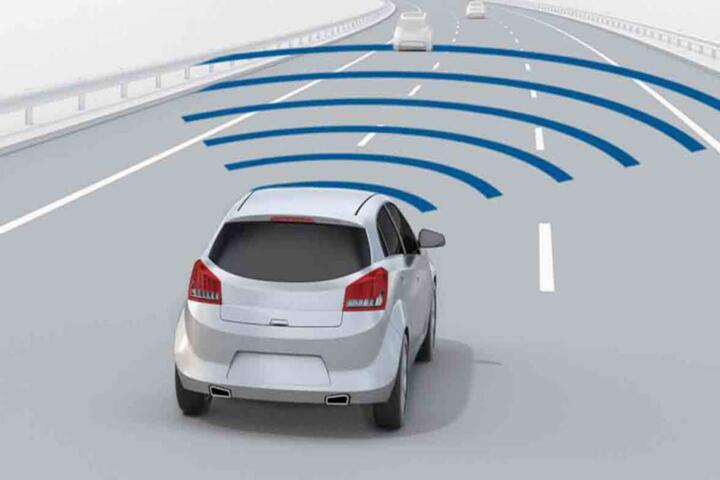
Adaptive cruise control has shifted from “hold a gap” to “plan around traffic.” Most systems still use radar for range, but newer versions add camera-based lane and vehicle tracking to smooth speed changes.
In practice, ACC often targets a time gap near 1.5–2.0 seconds, then modulates throttle and braking to keep that gap. That number matters because a 2.0-second gap at 60 mph is roughly 176 feet of spacing, which changes how early the car must slow.
Vehicle type changes the outcome. A long-wheelbase SUV with a tall hood line can hide lane markings and affect camera confidence, while a low sedan usually gives the camera a cleaner view of the lane.
Regulatory and safety testing also shape what manufacturers ship. Many ACC systems are designed to work with forward-collision mitigation and lane-keeping features, and they often share sensors and software calibration.
Skip the marketing terms. Look for sensor notes in the owner’s manual.
Where drivers get burned
People often assume ACC behaves like a set-and-forget autopilot. It does not; it is a driver-assist system with limits on detection, braking authority, and lane awareness.
One common mistake is treating ACC as a substitute for lane discipline. If the lane markings fade, the camera may reduce confidence, and the car can revert to simpler radar-only behavior, which may feel more abrupt.
Another pain point is speed mismatch in mixed traffic. If a lead vehicle brakes harder than expected, ACC can lag by a fraction of a second while it recalculates, and that delay can show up as a noticeable “dip” in deceleration.
Financial consequences show up too. If ACC encourages longer highway commutes without changing driving habits, fuel economy can drop because the system still depends on traffic flow and your selected gap.
Real-world example: on a 2-lane road with frequent merges, ACC may repeatedly slow for cut-ins. That can add 5–15% more fuel use versus steady cruise, depending on how often you get forced into braking cycles.
Skip the assumption that it’s always smooth. The road decides.
How to judge smarter ACC
Check sensor coverage first
What to do: before buying, read the ACC section in the owner’s manual for sensor requirements and limitations. Why it works: manuals usually list conditions like heavy rain, glare, snow buildup, or blocked camera views. What it looks like: in a test drive, try ACC in light rain or at dusk if safe, and watch for warnings or reduced functionality. Tools: ask the dealer to show the exact ACC menu screen and the “system status” messages; some cars label “limited” mode. Outcome target: you want fewer “sensor blocked” alerts over your typical commute.
Short gaps can trigger alerts.
Test braking feel in traffic
What to do: in stop-and-go traffic, set ACC to a moderate gap and observe how quickly it matches the lead car. Why it works: smarter ACC uses predictive logic to reduce jerk, but it still must decide when to brake versus coast. What it looks like: a well-tuned system reduces pedal “pulsing” and keeps deceleration within a narrow band. Tools: use the car’s trip computer to compare average fuel economy over two similar drives, one with ACC and one without. Numbers to watch: if your average drops by more than about 1–2 mpg on the same route, the system may be forcing extra speed cycling.
Brake jerk is the tell.
Evaluate curve and lane behavior
What to do: drive through a gentle curve where lane markings are visible, then slightly reduce visibility with sun glare or passing shadows. Why it works: camera-assisted lane tracking helps ACC anticipate bends and keep a steadier target speed. What it looks like: the car should maintain lane position without frequent disengagement, and ACC should avoid sudden speed changes mid-curve. Tools: look for a “lane assist” indicator and note whether ACC speed control continues when lane confidence drops. Outcome: if ACC repeatedly cancels on curves you drive often, it’s a mismatch for your routes.
Glare can cut camera confidence.
Confirm lane-change logic
What to do: test ACC during a controlled lane change on a multi-lane road, then watch how it handles the adjacent vehicle. Why it works: newer systems coordinate with blind-spot monitoring and steering control, but they still rely on target tracking quality. What it looks like: the car should either hold speed smoothly or transition to a new gap without hard braking. Tools: use the driver display to confirm whether the car is in “adaptive cruise” only or “adaptive cruise with lane guidance.” Numbers: note how often it slows more than you expect; repeated extra deceleration can cost time and fuel.
Hard braking means poor prediction.
Understand gap settings and jerk
What to do: try at least two gap settings—one short, one medium—then drive the same stretch. Why it works: time-gap selection changes how early the system brakes, which affects both comfort and fuel use. What it looks like: a short gap can feel responsive but increases the chance of braking for every minor lead-vehicle fluctuation. Tools: compare fuel economy and also how often you override with the brake pedal. Outcome: many drivers settle around a medium gap because it reduces “accordion” speed changes in traffic.
Medium gaps usually reduce cycling.
Look for software maturity cues
What to do: ask whether the ACC system has received updates and whether the car supports over-the-air updates. Why it works: ACC behavior depends on calibration, and firmware updates can change detection thresholds and smoothing. What it looks like: some cars show a software version number in the settings; on my last test drive, I saw a version label that helped me compare build dates. Tools: check the build date and ask for the latest update history in the service portal. Numbers: track how long it takes to download updates and whether the update requires a dealer visit.
Version numbers matter more than hype.
Plan for disengagement triggers
What to do: learn the exact triggers for ACC cancellation in your model year. Why it works: smarter ACC reduces false disengagement, but it still drops out when sensors lose targets or when you change lanes abruptly. What it looks like: the display may show “resume” and the car may revert to manual throttle/brake. Tools: practice disengaging and resuming in a safe area so you know the timing. Outcome: you want predictable resume behavior, not a delayed response when traffic tightens.
Practice resuming before you need it.
Account for drivetrain and braking limits
What to do: match ACC expectations to the vehicle’s braking system and powertrain. Why it works: a heavy SUV with a 3.0L turbo diesel or a 2.0L turbo gas engine can still modulate braking, but the feel depends on brake-by-wire tuning and traction control. What it looks like: in low-speed creep, some cars feel smoother than others because of how they blend regen and friction braking. Tools: if the car is hybrid or EV, check whether ACC uses regenerative braking first and how that affects deceleration. Numbers: EVs with 60–80 kWh battery packs often show stronger regen response, but winter range and tire grip can change the braking blend.
Braking blend changes with powertrain.
Mini case: fleet route smoothing
A regional delivery company ran 42 vehicles on a 68-mile loop with repeated highway merges. The problem was driver complaints about “late braking” and extra pedal use, which increased wear on friction brakes and raised driver fatigue.
They switched to a trim with ACC that used both radar and camera lane tracking, then standardized gap settings at 2.0 seconds. Drivers also received a short checklist: avoid lane changes while ACC is actively braking hard, and keep hands ready for disengagement prompts.
Result after 3 months: average brake-pad replacement intervals improved by about 10–15% on the most-used routes, based on maintenance records. Fuel economy improved modestly, roughly 1–3%, because drivers stopped forcing manual corrections during ACC speed cycling.
Skip the idea that software alone fixes everything. Training changed the inputs.
Mini case: family road-trip behavior
A family with a 2.5L naturally aspirated sedan and a 1,000-lb towing accessory used ACC on long weekends. The issue was not towing capacity; it was stability during traffic slowdowns near exits where lead vehicles changed lanes.
They adjusted ACC gap to a medium setting and used the system’s lane guidance only when lane markings were clear. They also avoided using ACC in heavy rain where the camera frequently displayed reduced visibility.
Result after two road trips: cabin stress dropped because deceleration felt more predictable, and they reported fewer brake overrides. Fuel economy averaged about 28 mpg on highway segments, compared with 26–27 mpg on similar trips the previous year, though tire choice and traffic density still mattered.
Road conditions still set the ceiling.
ACC checklist for buyers
| Test item | What to look for | Why it matters | Pass/fail signal |
|---|---|---|---|
| Sensor limits | Manual notes on rain, snow, glare | Prevents surprise disengagement | Fewer “limited” warnings on your routes |
| Braking feel | Smooth decel without pedal pulsing | Reduces fatigue and overrides | Brake overrides stay rare in traffic |
| Lane confidence | Stable behavior on curves | Camera helps prediction | No repeated ACC cancellations mid-curve |
| Gap setting | Medium gap reduces cycling | Improves comfort and mpg | Fuel economy drop stays within ~1–2 mpg |
| Resume behavior | Predictable resume timing | Avoids late reaction in tight traffic | Resume matches your expectation within seconds |
Write down what happens on your commute.
Common mistakes and fixes
Mistake: using the shortest gap in heavy traffic. Why it happens: drivers want quick response and assume closer spacing equals better flow. Impact: the car brakes for every small lead-vehicle change, which increases brake wear and driver overrides. Avoid it: start at a medium gap and only shorten it when traffic is stable and lane markings are clear.
Short gaps invite accordion braking.
Mistake: relying on ACC in poor visibility without checking warnings. Why it happens: the system may still engage even when detection quality is reduced. Impact: speed control can become less predictable, especially at night or in heavy rain. Avoid it: if the display shows reduced sensor performance, switch to manual driving for that segment.
Warnings are not decoration.
Mistake: testing only on empty roads. Why it happens: it feels safer to try ACC with no traffic. Impact: you miss the real failure modes, like cut-ins and lead-vehicle braking variability. Avoid it: test on a route with merges and at least one stop-and-go section, even if it’s short.
Empty roads hide the hard cases.
Mistake: ignoring software update history. Why it happens: buyers focus on hardware and skip firmware. Impact: calibration changes can alter braking smoothness and lane confidence thresholds. Avoid it: ask for the latest update status and note the software version shown in settings.
Updates can change behavior quietly.
FAQ
Does adaptive cruise work in snow?
Many ACC systems can operate in light snow, but performance depends on sensor cleanliness and traction. Radar usually remains more reliable than cameras, yet camera-based lane tracking can struggle when snow obscures lane markings. If the system shows “limited” status or repeatedly cancels, switch to manual control. For winter driving, also consider tire choice and brake condition, because ACC braking blends with traction control and can feel different on low-grip surfaces.
Why does ACC brake late sometimes?
Late braking often comes from target changes. If the lead vehicle cuts in from another lane, the system must reacquire a new target and re-estimate relative speed. Another cause is lead-vehicle braking that is stronger than expected, which forces a recalculation cycle. In practice, using a medium gap reduces how often you encounter “too-close, too-fast” scenarios. If late braking happens repeatedly on your route, test again with a different gap and in different lighting.
Can ACC handle lane changes?
Some ACC systems coordinate with lane guidance, but the scope varies by model year. Many systems do not perform full autonomous lane changes; they may only support speed control while you change lanes, or they may assist with steering under strict conditions. During testing, watch whether ACC speed control continues smoothly when you signal and move into a new lane. If the car slows hard or disengages, treat that as a limitation and plan to drive manually during those maneuvers.
Does ACC affect fuel economy?
ACC can improve fuel economy on steady highways, but it can also worsen it in stop-and-go traffic. The reason is simple: ACC still reacts to lead-vehicle speed changes, and frequent braking and acceleration cycles cost energy. Fuel economy also depends on your chosen gap and how often you override the system. A practical check is to compare average mpg over two similar routes and days, using the same tire pressure and driving mode. If the difference exceeds about 1–2 mpg, your route may be too merge-heavy for that calibration.
What maintenance matters for smarter ACC?
ACC depends on sensors, so maintenance is mostly about keeping them calibrated and clean. Windshield camera units need a clear view; heavy grime, stickers, or cracked glass in the camera zone can reduce performance. Radar sensors need to stay free of mud and damage, and front-end repairs should be done with attention to sensor alignment. If you replace windshield glass, confirm the shop uses the correct calibration procedure for your vehicle. Warranty coverage varies, so check whether sensor-related issues are covered under bumper-to-bumper or a separate driver-assist warranty.
Author's Insight
Adaptive cruise control gets smarter when manufacturers improve target tracking and prediction, not when they add more buttons. Camera-assisted lane tracking helps the system anticipate curves and merges, but it also introduces sensitivity to glare, snow, and lane-marking quality.
In real ownership, the biggest difference shows up in how often you override the system and how smooth the braking feels in traffic. That behavior ties to gap settings, braking blend strategy, and the calibration maturity of the specific model year.
Some systems also evolve through software updates, so two cars with the same hardware can behave differently after a firmware change. If you buy used, ask for the update history and confirm the current software version.
Skip the assumption that “more features” equals better behavior on your roads.
Key takeaways
Smarter ACC uses better sensing and prediction, but it still has limits tied to visibility, lane markings, and target acquisition. Your next step is a short test drive on your actual commute: try medium gap settings, observe braking smoothness in stop-and-go, and check how often the system cancels on curves and merges.
Benefits tend to show up as fewer brake overrides and steadier speed control, which can also help fuel economy when traffic is predictable. Limits show up when sensors struggle, when lead vehicles change lanes abruptly, or when road markings are poor.
Maintenance matters: keep sensor areas clean, use correct windshield glass procedures, and document any ACC-related warnings for service visits. If you notice repeated unexpected braking, persistent sensor faults, or warning messages that do not clear, schedule a diagnostic with a qualified technician rather than continuing to rely on the system.
Drive it like a helper, not a replacement.